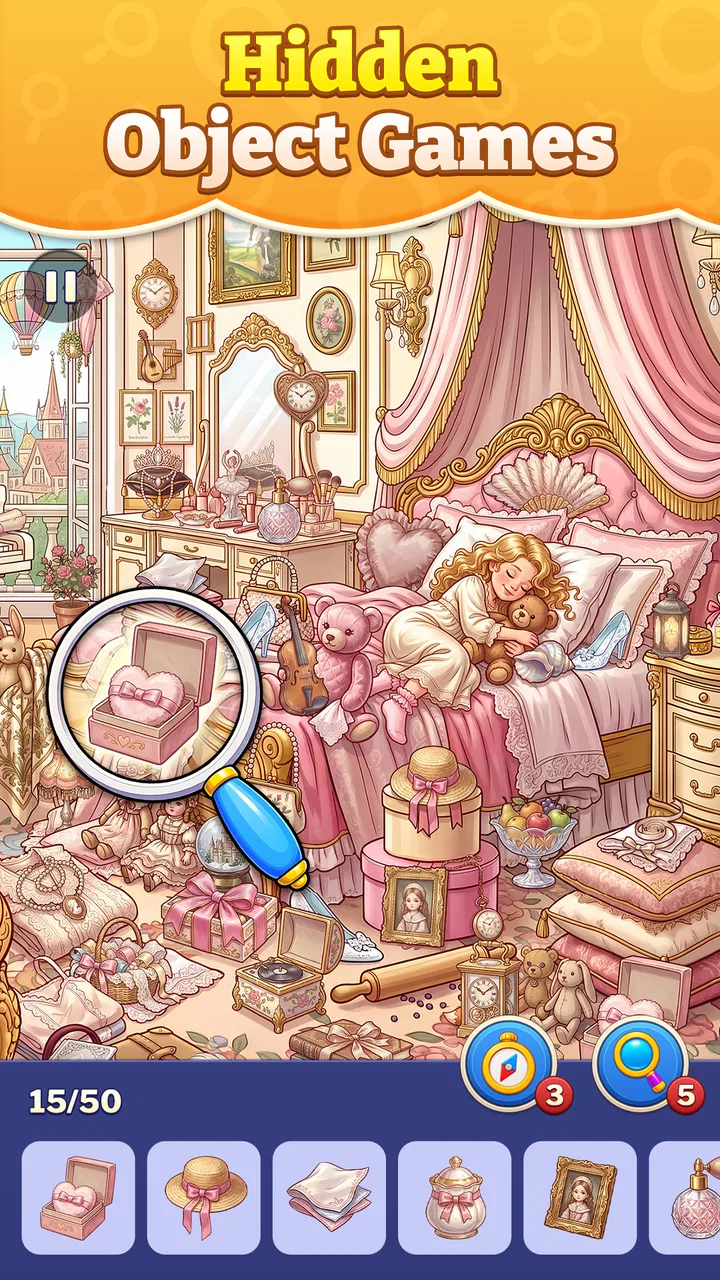
Hidden Objects Game: Find & Go
- 4.9
- Rating
- 50.00K
- Installs
- Free
- Price

 Analysis by App-foxy
I spent time with Hidden Objects Game: Find & Go as a casual puzzle game, and its appeal became clear very quickly: it asks me to slow down, scan a scene carefully, and enjoy the small satisfaction of spotting what was hiding in plain sight. It is free to start, suitable for Everyone, and developed by Guru Puzzle Game, so it is aimed at a broad audience rather than a narrow group of expert players.
This is not a game I would choose when I want a dramatic story, competitive action, or complicated rules. I would choose it when I have a few quiet minutes and want something focused but gentle. The basic idea is easy to understand, yet the experience can still make me look twice at a crowded image. That balance is the main reason I found it easy to return to.
How the hidden-object format feels in everyday play
The strongest part of the game is its simple mental rhythm. I look over a scene, form a search pattern, and gradually remove the objects I recognize. That process feels more involved than tapping through a completely passive activity, but it is less demanding than a traditional logic puzzle that requires several steps of deduction.
You May Also Like

 Pandora - Music & Podcasts
Pandora’s Music Is Easy to Start, but Harder to Recover
Pandora’s strength is its low-effort path from a seed to a station. Its weak spot is how much confidence it asks you to place in connection, setup, and quiet recovery.

 8 Ball Pool
 Is Built on Rivalries, Rematches, and Routine
A close look at the rivalries, rematches, shared routines, and unanswered safety questions that turn a quick pool match into a persistent mobile community.

 Samsung Music
’s Quiet Strength Is Playing What You Already Own
Its reach comes less from spectacle than from dependable access to a personal library. That simplicity is both the app’s strongest retention engine and its ceiling.

 AccuWeather: Weather Radar
AccuWeather Review: A Quick, Clear Forecast for Everyday Decisions
For everyday plans, the best forecast is the one you can understand quickly. AccuWeather makes rain timing, radar, and local conditions easy to act on, with a few trade-offs.

 Hill Climb Racing
Why Hill Climb Racing Still Turns Crashes Into One More Run
A tiny car, a bumpy hill and one more upgrade: Hill Climb Racing keeps resurfacing because its simple chaos makes every near-miss feel personal.

 AliExpress - Shopping App
AliExpress Makes Global Shopping Feel Personal, but Shoppers Bear the Risk
AliExpress turns a global marketplace into a pocket-sized discovery engine. Its reach is useful, its shopping loop compelling, and its trade-offs easy to miss.
More From Our News Desk
View All News


I especially like the way this format fits short breaks. Imagine waiting for an appointment or taking a quiet pause after work. A single search scene gives me a clear task without asking me to remember a complicated storyline or prepare a long strategy. If I stop midway, the game is also the kind of experience I can mentally leave behind and revisit when I am ready.
There is a useful difference between searching randomly and searching methodically. I get better results by dividing the image into sections, checking the edges, then moving toward the center. I also try to notice unusual color, shape, or scale instead of repeatedly staring at the most obvious objects. This approach makes the game feel more like visual organization than simple guessing.
That is one of the less obvious strengths here: it rewards a repeatable workflow. Players who immediately tap wherever something seems familiar may become frustrated by overlooked details. Players who scan in rows or zones usually create a calmer experience for themselves. The game does not need to teach that habit directly for it to become useful.
Speed expectations and the value of a calm pace
I would describe the perceived pace as deliberately unhurried. The challenge comes from visual attention, not from fast reflexes. That makes it approachable for people who do not enjoy timed action games, and it also makes the game a reasonable choice for family play where different ages may want to take turns.
At the same time, a relaxed pace does not mean every scene feels effortless. A busy picture can slow me down because I need to distinguish a target from nearby shapes and colors. That is a good kind of friction when I am in the mood to concentrate, but it can feel less enjoyable when I want instant progress.
My practical tip is to avoid zooming mentally into one small area too early. I first make a broad pass across the whole scene, marking the objects that stand out. Then I return to the visually dense areas. This prevents the common problem of spending too long on one corner while several easy finds remain elsewhere.
The game is therefore better suited to a steady pace than to speed-running. Anyone expecting rapid levels, constant rewards, or action-heavy momentum may find it restrained. Anyone who enjoys the feeling of gradually bringing order to a complicated picture will probably appreciate that restraint.
What happens during longer or heavier play sessions
During a short session, the main demand is attention. During a longer session, the demand shifts toward patience and screen focus. Repeatedly examining detailed scenes can become tiring, especially if I play without taking a pause. That is not a technical fault, but it is an important part of the experience because the game’s central activity is visual scanning.
I found that alternating between broad searches and detailed searches helps. On one scene, I might focus on large shapes and obvious color contrasts. On the next, I might slow down and inspect the less noticeable areas. This small change keeps the activity from feeling like I am using exactly the same mental motion over and over.
For heavy use, I would treat it as a collection of short relaxation sessions rather than a game to grind continuously for hours. That choice matches the design better and reduces the chance that the screen-searching task starts to feel repetitive. It also makes the game useful in different situations: a quick distraction during the day, or a quiet wind-down before bed.
One trade-off is that the simplicity can work against long-term excitement for players who need constant novelty. The game’s appeal is concentrated in the search itself. If you prefer evolving characters, multiplayer competition, or increasingly complex systems, this may feel too narrow even if you enjoy the first few scenes.
Another practical consideration is spending. The game is free, but it includes in-app purchases ranging from $1.99 to $96.99 per item. That does not automatically make the experience poor, yet it means I would approach optional purchases carefully. For a casual puzzle game, I would set a personal limit before playing and avoid treating a difficult search as a reason to buy something impulsively.
Reliability, stability, and recovering from interruptions
My overall impression is that the game is built around a straightforward activity rather than a complicated collection of systems. That simplicity is reassuring because there are fewer layers competing for attention while I search a scene. I can concentrate on the picture instead of managing a large inventory, a character build, or a complicated menu structure.
Still, reliability is not only about whether a game opens. It is also about how comfortable it feels when I return after an interruption. A hidden-object session naturally invites interruptions because it fits into spare moments. A call, message, commute, or household task can break concentration, so I prefer to play when I can give the scene at least a few uninterrupted minutes.
My recovery habit is simple: after returning, I do not immediately tap at the last place I remember. I take a fresh full-screen scan first. This helps because visual memory can be unreliable after a pause, and it reduces the chance of repeatedly checking the wrong area. It is a small technique, but it makes interrupted sessions less frustrating.
The game’s Everyone content rating also makes it easier to recommend in a shared household. I can see it working for a parent and child taking turns, or for someone looking for a low-pressure puzzle that does not depend on mature themes. Adults who want a peaceful visual challenge may enjoy it too, although the accessible presentation should not be mistaken for deep strategic complexity.
The current version is 1.6.0, which is useful context for anyone deciding whether to install it now. I would still keep normal expectations about mobile software: an individual device, operating-system version, and background workload can affect how any game feels. My judgment here is about the character of this particular experience, not a promise that every phone will behave identically.
Device constraints and who should install it
The minimum operating-system requirement is Android 7.0. That gives the game a relatively broad starting point for Android users, including people who are not using the newest hardware. Even so, compatibility on paper is not the same as comfort in practice. A phone with a small display may make tiny details harder to distinguish, while a larger screen can make visual scanning more pleasant.
Screen size is more important here than it would be in a simple word puzzle. The entire point is to notice objects inside an image, so cramped viewing can turn a relaxing search into eye strain. I would favor a device with a clear display and enough brightness control to avoid glare. Playing in a dark room may also make extended searching less comfortable, regardless of how well the game runs.
Resource demands are best judged by the style of play rather than by imagined technical figures. This is a scene-searching puzzle, not a graphically intense action game, so I would approach it as a lighter choice for casual use. I would not assume that every older device will feel identical, though. If a phone is already struggling with storage, background apps, or general responsiveness, closing unnecessary apps before playing is sensible.
Battery expectations also depend on how long I keep the screen active. A brief search is a different use case from a long session of examining detailed images. I would not install it specifically as a battery-saving tool, but its short-session nature makes it easy to use without committing to a lengthy play period. That flexibility is more relevant to me than a claim that it consumes a particular amount of power.
With over 50 thousand installs and a 4.9 average from around 2.1 thousand ratings, it has attracted a positive early audience. Those figures suggest that the basic concept is connecting with players, but they do not replace personal testing. A high average cannot tell me whether I will enjoy searching carefully, and it cannot make a visual puzzle suitable for someone who dislikes repetition.
The game is a good match for casual puzzle fans, families seeking an easy-to-understand activity, and adults who like quiet concentration. It is less suitable for players who want a strong narrative, competitive leaderboards, fast reactions, or a deep progression system. I would also skip it when I am already tired of looking closely at screens, because the central mechanic requires exactly that kind of attention.
How it compares with familiar puzzle alternatives
Compared with match-three games, this title feels less frantic and less dependent on creating chains or planning combinations. Match-three play usually gives me a stronger sense of immediate motion, while this game gives me a slower sense of discovery. I would choose the match-three alternative when I want quick feedback and choose this one when I want my attention to settle on one scene.
Compared with crosswords or word puzzles, the challenge is more visual than language-based. That makes it useful when I want a puzzle that does not depend as heavily on vocabulary or spelling. On the other hand, word games can offer more room for layered reasoning, so a player looking for intellectual variety may eventually prefer them.
Compared with jigsaw-style games, hidden-object searching gives me a more directed goal. I am not assembling an image piece by piece; I am interpreting an already complete scene and locating selected details. That makes the sessions easier to start, but it may feel less creative for someone who enjoys building and arranging.
Compared with competitive puzzle apps, the main advantage is the absence of pressure in the core activity. I can focus on observation rather than ranking. The disadvantage is equally clear: without competition or a demanding strategic layer, the experience may not provide enough motivation for players who need an external challenge to keep returning.
Small techniques that make difficult scenes friendlier
My first useful technique is to create a visual route. I scan from left to right, then repeat the process lower down instead of jumping around. This gives my eyes a structure and makes it easier to notice a small object that blends into its surroundings. It also helps me tell the difference between a genuinely difficult target and an area I simply have not searched properly.
My second technique is to use negative space. Empty or less crowded areas are worth checking because a target can stand out there in a different way from objects hidden inside a busy cluster. After that, I inspect borders, corners, and places where similar colors meet. These areas often deserve a deliberate second pass rather than a quick glance.
My third technique is to change distance from the screen. I avoid holding the phone too close for the entire session. Looking from a normal distance helps me see the overall composition, while a brief closer look can help with a stubborn detail. This is both a search strategy and a comfort measure, particularly during a longer session.
I also recommend stopping before frustration takes over. If I have scanned the same section several times without progress, I put the phone down for a moment and return with a different visual starting point. The pause is useful because the eyes can become fixed on an incorrect assumption. In a game built around observation, a reset can be more effective than more effort.
My performance verdict after using it
Hidden Objects Game: Find & Go works best as a focused, low-pressure puzzle for short breaks and quiet evenings. Its perceived speed is calm, its visual demand is manageable when I use a methodical search, and its broad Android requirement makes it approachable for many users. The experience is not trying to replace an action game, and I think it is better judged on how comfortably it turns a few spare minutes into a small observation challenge.
I would recommend it to a friend who enjoys finding details in illustrations and wants a simple game that can be picked up without a tutorial-heavy commitment. I would mention the in-app purchase range before they spend anything, and I would suggest deciding on a budget in advance. The free entry point is convenient, but optional purchases should remain a choice rather than a response to one stubborn scene.
The game’s main limitation is also its identity: searching is the whole experience. If that activity relaxes you, the focused design is a strength. If you need stories, social competition, rapid action, or complex puzzle mechanics, another category will serve you better. I would not call it a universal recommendation, but I would call it a convincing option for the right mood.
With 113 reviews alongside its strong average, the response so far is encouraging, and the Everyone rating broadens its appeal. My final view is straightforward: install it when you want visual concentration without pressure, use a systematic scanning pattern, take breaks during longer sessions, and judge it by the calm satisfaction of finding details rather than by the excitement of a conventional arcade game.
FAQs for Hidden Objects Game: Find & Go
01What is Hidden Objects Game: Find & Go?
Hidden Objects Game: Find & Go is a casual puzzle game centered on searching illustrated scenes for objects that are cleverly concealed in the background. Each level challenges you to study the image carefully, identify the requested items, and complete the scene within the available rules or time limit. It is designed for players who enjoy observation, concentration, and relaxed hidden-object gameplay on mobile devices.
02How do you play Hidden Objects Game: Find & Go?
Gameplay is straightforward: a list of objects appears on the screen, and you must locate each one within the detailed scene. Tap an item when you find it, then continue searching until the list is complete. The main challenge comes from similar colors, small details, and objects blended into the environment. Taking your time and scanning the image systematically is usually more effective than tapping randomly.
03Is Hidden Objects Game: Find & Go suitable for children?
The game can be suitable for children who enjoy visual puzzles, although parents should check the recommended age rating and the content shown on the store listing before downloading. Hidden-object games can help encourage attention to detail, visual recognition, and patience, but difficulty and time-based mechanics may frustrate younger players. Adult supervision is also recommended if the app includes advertisements or optional purchases.
04Does Hidden Objects Game: Find & Go require an internet connection?
The basic hidden-object levels may be playable without a constant internet connection, which makes the game convenient for short sessions while traveling or when mobile data is unavailable. However, certain features can depend on connectivity, including advertisements, updates, cloud-related functions, rewards, or promotional content. For the most reliable information, test the installed version in offline mode and review the developer’s current store description.
05Is Hidden Objects Game: Find & Go free to download?
Hidden Objects Game: Find & Go may be available as a free download, but free access does not always mean that every feature is completely unrestricted. Depending on the version, players may encounter advertisements, optional in-app purchases, extra hints, or content that unlocks gradually. Before installing, check the Google Play Store or Apple App Store listing for the latest pricing, purchase details, supported devices, and privacy information.
Pros
- Relaxing gameplay suitable for short sessions
- Wide variety of hidden-object scenes to explore
- Helpful hints make difficult searches more manageable
- Simple controls are easy for players of all ages
- Progression provides a clear reason to keep playing
Cons
- Some scenes may feel repetitive after extended play
- Small objects can be difficult to spot on smaller screens
- Hints or extra attempts may be limited during challenging levels
- The game may become less engaging for experienced puzzle fans
- Ads can interrupt the flow between scenes

Hidden Objects Game: Find & Go
Gallery